
Introduction
Loops are essential in C programming for executing a block of code multiple times. The do-while loop is a type of loop that ensures at least one execution before checking the condition. Unlike the while loop, which evaluates the condition first, the do-while loop executes the block of code first and then checks the condition.
In this article, we’ll explore the syntax, working mechanism, examples, and best practices of using the do-while loop in C.
What is a Do-While Loop in C?
A do-while loop is an exit-controlled loop, meaning the condition is checked after executing the loop body. This guarantees that the loop runs at least once, even if the condition is initially false.
Syntax of Do-While Loop in C
do {
    // Code to execute
} while (condition);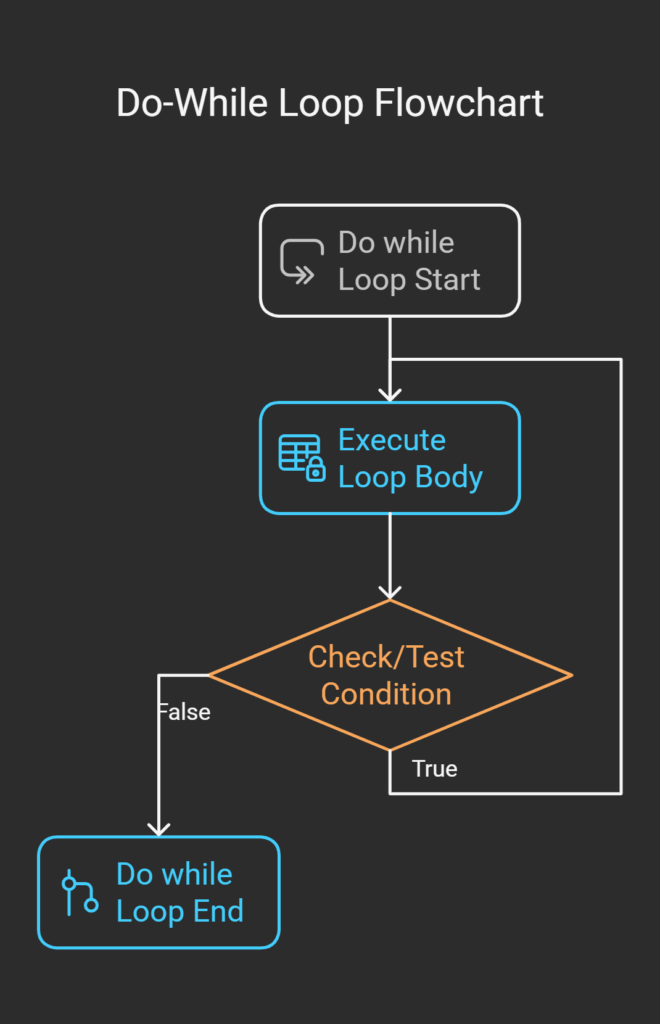
How Does the Do-While Loop Work?
- The code inside the do block executes first.
- After execution, the while condition is evaluated.
- If the condition is true, the loop repeats; if false, the loop terminates.
Example of Do-While Loop in C
Let’s look at a simple example that prints numbers from 1 to 5 using a do-while loop.
#include <stdio.h>

int main() {
    int i = 1;

    do {
        printf("%d\n", i);
        i++;
    } while (i <= 5);

    return 0;
}
Output:
1
2
3
4
5
Explanation:
- The variable
iis initialized to 1. - The
doblock printsiand increments it. - The condition
i <= 5is checked after execution. - Since
iincreases in each iteration, the loop stops whenibecomes 6.
Use Cases of Do-While Loops in C
- The do-while loop is particularly useful when:
- You need the loop to execute at least once, such as menu-driven programs.
- The loop condition is based on user input validation.
- You are working with repeated tasks, like reading data from a file.
Practical Example – User Input Validation
#include <stdio.h>

int main() {
    int num;

    do {
        printf("Enter a positive number: ");
        scanf("%d", &num);
    } while (num <= 0);

    printf("You entered: %d\n", num);
    return 0;
}
Output (Example Run 1):
Enter a positive number: -3
Enter a positive number: 0
Enter a positive number: 5
You entered: 5
Explanation:
- The loop ensures the user enters a positive number before proceeding.
- Even if the first input is invalid (negative or zero), the loop repeats until a valid number is entered.
Do-While Loop vs. While Loop in C
| Feature | Do-While Loop | While Loop |
|---|---|---|
| Condition Check | After executing the loop body | Before executing the loop body |
| Minimum Executions | At least one | Could be zero |
| Best Use Case | When you must execute the code at least once | When execution depends on an initial condition |
Example to Demonstrate the Difference
#include <stdio.h>

int main() {
    int x = 10, y = 10;

    while (x < 5) {
        printf("This won't execute\n");
    }

    do {
        printf("This executes at least once\n");
    } while (y < 5);

    return 0;
}
Output:
This executes at least once
- While Loop: The condition
x < 5is false, so it doesn’t execute. - Do-While Loop: The block runs once, even though
y < 5is false.
Advantages:
- Ensures at least one execution – useful for user-driven programs.
- Simplifies input validation – great for menu-based applications.
- Easy to use when the loop logic requires one-time execution before checking conditions.
Disadvantages:
- Risk of infinite loops if the condition never becomes false.
- Less commonly used compared to for-loops or while-loops.
- Less efficient in cases where pre-checking a condition would prevent unnecessary execution.
Best Practices for Using Do-While Loops
Use only when needed: Avoid do-while if a while loop is more suitable.
Ensure condition update: Modify loop variables properly to prevent infinite loops.
Use for menu-driven programs: Do-while is ideal for menu-based or interactive programs.
Key Takeaways
- The do-while loop executes at least once before condition checking.
- It is useful for menu-driven applications and user input validation.
- It differs from the while loop, which checks the condition before execution.Best practices include preventing infinite loops and using them only when necessary.
Practice Exercise
Write a C program using a do-while loop to display a menu repeatedly until the user chooses to exit.
#include <stdio.h>

int main() {
    int choice;

    do {
        printf("\nMenu:\n");
        printf("1. Option 1\n");
        printf("2. Option 2\n");
        printf("3. Exit\n");
        printf("Enter your choice: ");
        scanf("%d", &choice);

    } while (choice != 3);

    printf("Exiting program...\n");
    return 0;
}
Expected Output:
Menu:
1. Option 1
2. Option 2
3. Exit
Enter your choice: 1

Menu:
1. Option 1
2. Option 2
3. Exit
Enter your choice: 2

Menu:
1. Option 1
2. Option 2
3. Exit
Enter your choice: 3
Exiting program...
This program keeps displaying the menu until the user selects ‘Exit’.
Conclusion
The do-while loop in C is a powerful tool for executing tasks at least once before checking a condition. It is ideal for user input validation, menu-driven applications, and repeated tasks. However, improper use can lead to infinite loops, so always ensure proper condition updates.
By mastering the do-while loop, you can write more flexible and efficient C programs. Keep practicing, and soon, you’ll become confident in handling loop structures in C
Interview Questions
1.What is a do-while loop in C, and how does it differ from other loops? (google)
The do-while loop in C is a control flow statement that ensures a block of code executes at least once, regardless of whether the condition is initially true or false. This loop first executes the body and then checks the condition at the end of each iteration.
2.Why would you prefer a do-while loop over a while loop in C programming? (Meta)
A do-while loop is preferred over a while loop when you want to execute a block of code at least once before checking a condition. This is especially useful in scenarios where:
- User Input Validation: If you need to prompt a user for input, you may want to display the message at least once before validating the input.
- Menu-Driven Programs: In a program where a menu is displayed and the user makes a selection, the menu should be displayed at least once before checking for exit conditions.
- Repeated Execution Until a Condition is Met: When you want a loop to run at least once, regardless of the initial condition.
3.Can you provide a real-world example where a do-while loop is useful? (IBM)
A real-world example where a do-while loop is useful is a login system where a user must enter the correct password before proceeding. The prompt should appear at least once, even if the user enters the correct password on the first attempt.
4.How can you prevent an infinite loop when using a do-while loop?
An infinite loop occurs when the loop’s condition never evaluates to false, causing the program to run indefinitely. In a do-while loop, this happens if the termination condition is not correctly updated inside the loop.
5.What happens if the condition in a do-while loop is initially false? Will the loop execute?
Yes, the do-while loop will execute at least once, even if the condition is initially false. This is because the condition is checked after executing the loop body.
learn more about loops in python and c programing
Lets play : Do while loop