
Lists comprehension is one of the most powerful features in Python for working with lists. It enables concise and readable code that can replace loops. It’s not just about condensing code, but also improving performance and code readability. In this guide, we’ll explore Python list comprehension in detail, walk through its syntax and use cases, and finish with a mini-project.
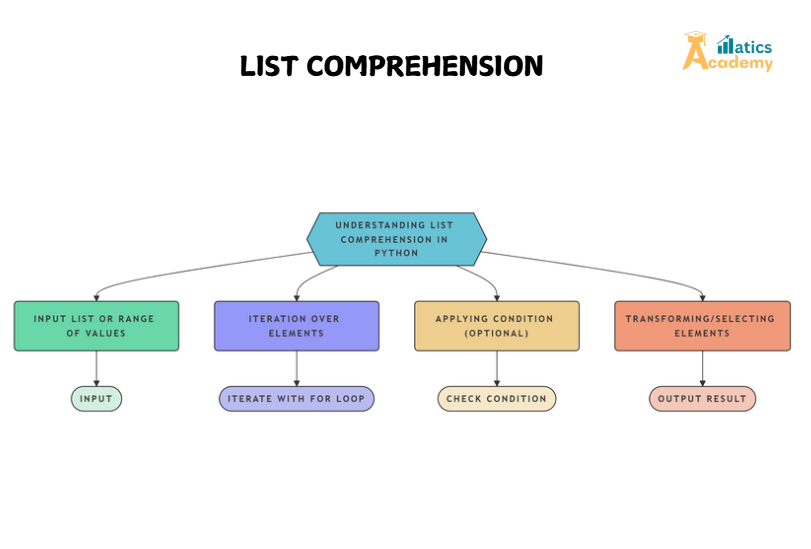
What is List Comprehension?
List comprehension provides a compact way of generating lists by iterating over an iterable and applying an expression to each element. It is both a syntactical feature and a performance optimization tool. Instead of writing several lines of code to loop over a list and append results, list comprehension lets you write it in a single line.
The basic syntax for list comprehension is:
[expression for item in iterable if condition]
- expression: The result you want to include in the list.
- item: Each element in the iterable you’re looping over.
- iterable: The collection (e.g., list, string, tuple) you are iterating through.
- condition (optional): Filters the items that meet the condition.
Basic Example
Let’s start with a basic example where we square each number in a list:
numbers = [1, 2, 3, 4, 5]
squared_numbers = [x ** 2 for x in numbers]
print(squared_numbers)
Output:
[1, 4, 9, 16, 25]
Here, [x ** 2 for x in numbers] means “square each element in the list numbers“.
Why Use List Comprehension?
- Conciseness: Reduces multiple lines of code to a single line, making it easier to read and maintain.
- Performance: List comprehension is often faster than using traditional loops, as it avoids the overhead of method calls like
append(). - Readability: List comprehension is easier to understand, especially when you want to filter or transform lists.
Advanced Use Cases
1. Filtering Items
You can add a conditional if to filter out unwanted elements from the list.
numbers = [1, 2, 3, 4, 5, 6]
even_numbers = [x for x in numbers if x % 2 == 0]
print(even_numbers)
Output:
[2, 4, 6]
This example shows how to filter even numbers from a list.
2. Nested List Comprehension
You can also use list comprehension inside another list comprehension to handle nested data, such as flattening a 2D list.
matrix = [[1, 2], [3, 4], [5, 6]]
flattened = [item for sublist in matrix for item in sublist]
print(flattened)
Output:
[1, 2, 3, 4, 5, 6]
Here, we flatten a matrix (a list of lists) into a single list of numbers.
Mini Project: Filtering and Transforming Data
Let’s now build a simple project where we filter out even numbers from a list, then square them. This combines list comprehension with filtering and transformation.
# Mini-Project: Filter Even Numbers and Square Them
numbers = [1, 2, 3, 4, 5, 6, 7, 8, 9, 10]
even_squared = [x ** 2 for x in numbers if x % 2 == 0]
print(even_squared)
Explanation:
- Filtering: We select only the even numbers (
x % 2 == 0). - Transformation: Each selected even number is squared (
x ** 2).
Output:
[4, 16, 36, 64, 100]
This project demonstrates how list comprehension can be used in real-world scenarios for data filtering and transformation.
Interview Questions and Answers
Amazon
Q1: How would you explain the difference between list comprehension and a for loop?
A1: List comprehension is a concise, one-liner syntax for creating lists, while for loops are longer and involve manually appending results. List comprehension is faster and more readable for simple operations.
Q2: Can list comprehension improve performance?
A2: Yes, list comprehension is optimized internally and avoids the overhead of multiple method calls like append(). This results in faster code execution for creating new lists.
Zoho
Q3: What’s the benefit of using list comprehension in Python?
A3: It allows writing clean, concise, and faster code for creating and manipulating lists. It’s especially useful for filtering and transforming data in a compact manner.
Infosys
Q4: Can you use list comprehension with multiple conditions?
A4: Yes, you can combine multiple conditions using logical operators like and or or. For example: [x for x in numbers if x > 2 and x % 2 == 0].
TCS
Q5: How would you handle nested lists with list comprehension?
A5: You can use nested list comprehension to iterate over the inner lists, as shown in the matrix flattening example.
List Comprehension